App Cache Cleaner Pro - Clean
We're working on a solution.
Thank you for your patience!
~~~ App Cache Cleaner,a quick tool for clearing application cached files.
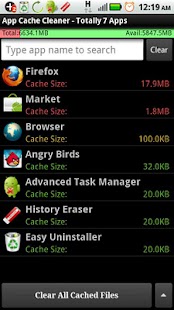
One Tap to clean all cached files for getting more avalable space.
This tool can free a lot of storage memory for your phone.
Free phone internal momeory, Get more internal rom storage.
It is an app which is crucial to anyone who has memory management issues.
If you running out of application storage, you now can get more available storage space by clearing apps created cache/data files.You don't have to ROOT the phone anymore!
★ 1-tap to clear all cached files
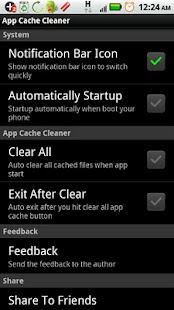
★ auto clear when you open this app
★ auto clear all cache at a specified interval
★ auto exit when you cleaned all cached files
★ clear cache for a specified application
★ list applications by either cache size or app name
By long pressing any item in the app list, you can:
★ Share apps with your friends
★ view application on Market
★ uninstall applications which has cached files
★ open application
★ show application details page
If you just want to clear all cached files, you don't need to wait the completion of building apps list, just tap the 'Clear All Cache Files' button.
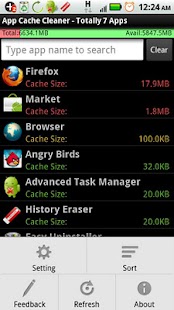
You can rebuild app list by MENU > Refresh, and choose different sort type by MENU > SortFor more settings, please tap MENU > Settings.
#FAQwhat is cached file?A cached file is a mechanism for the temporary storage (caching) of web documents, such as HTML pages and images, to reduce bandwidth usage, server load, and perceived lag.
A cached file stores copies of documents passing through it; subsequent requests may be satisfied from the cache if certain conditions are met.The cached files are stored in the phone built-in memory, and sometimes can take a lot of storage space.
Through the clearing of cached files, you are able to recover the precious phone memory space.
Most importantly,the cached files can safely be cleared :)
About App Cache Cleaner Pro - Clean
- Package name (App ID)
- mobi.infolife.cachepro
- Available on
- Google Play
- Price
- Free
- Developer
- Sam Lu
Looking for the App Cache Cleaner Pro - Clean APK?
The safest way to get App Cache Cleaner Pro - Clean (mobi.infolife.cachepro) on your Android device is to install it directly from Google Play — you'll always get the latest official version, automatic updates, and no risk of modified or infected APK files from third-party sites.
Social Features
Connect and share with friends and the community.
Weather Features
Get accurate weather forecasts and real-time updates.
Learning Tools
Enhance your learning experience with interactive features.
See App Cache Cleaner Pro - Clean in Action
Frequently Asked Questions
Is App Cache Cleaner Pro - Clean free?
Yes, App Cache Cleaner Pro - Clean is free to download and install on Android through Google Play.
How do I install App Cache Cleaner Pro - Clean on Android?
Open Google Play on your Android phone or tablet, search for App Cache Cleaner Pro - Clean by Sam Lu or tap the Google Play button on this page, then tap Install. The app downloads and installs automatically.
What is mobi.infolife.cachepro?
mobi.infolife.cachepro is the App ID (package name) of App Cache Cleaner Pro - Clean on Google Play. Every Android app has a unique package name, and it is the safest way to verify you are installing the official app.
Is App Cache Cleaner Pro - Clean safe to download?
Installing App Cache Cleaner Pro - Clean from Google Play is the safest option: you get the official version published by Sam Lu, verified by Google Play Protect, with automatic updates. Avoid APK files from unofficial third-party sites.

Get App Cache Cleaner Pro - Clean Today
App Cache Cleaner Pro - Clean for Android — free download on Google Play.
Compatible with Android phones and tablets — available on Google Play.
Ask AI about this app
Get instant answers about features, tips and more from popular AI assistants.